AI Overviews in Gmail Search: What You Need to Know
Andrew LeClair
|
Senior Director, Product Marketing
March 10, 2026
IN A NUTSHELL
• Gmail is testing a new generative AI search experience that allows users to ask questions about their inbox and receive summarized answers. • The feature uses Gemini to analyze subject lines, pre-headers, body copy, alt text, and attachments. • Because the model evaluates meaning and intent, clear and descriptive language matters more than clever phrasing. • As conversational inbox search expands, email content will need to be structured for both humans and AI models.
Google is bringing generative AI directly into the inbox, and it has real implications for how brands structure their email content. Often referred to as “Ask Gmail,” this feature allows users to ask natural language questions about their inbox and receive synthesized responses powered by Gemini.
Before we dive in, two important caveats:
This functionality is currently only available to Google AI Pro and Ultra subscribers.
Google has not announced if or when it will expand access to free accounts.
While adoption is limited for now, the direction is clear. Generative AI is coming for the inbox, and search is the first domino to fall.
What are AI Overviews in Gmail Search
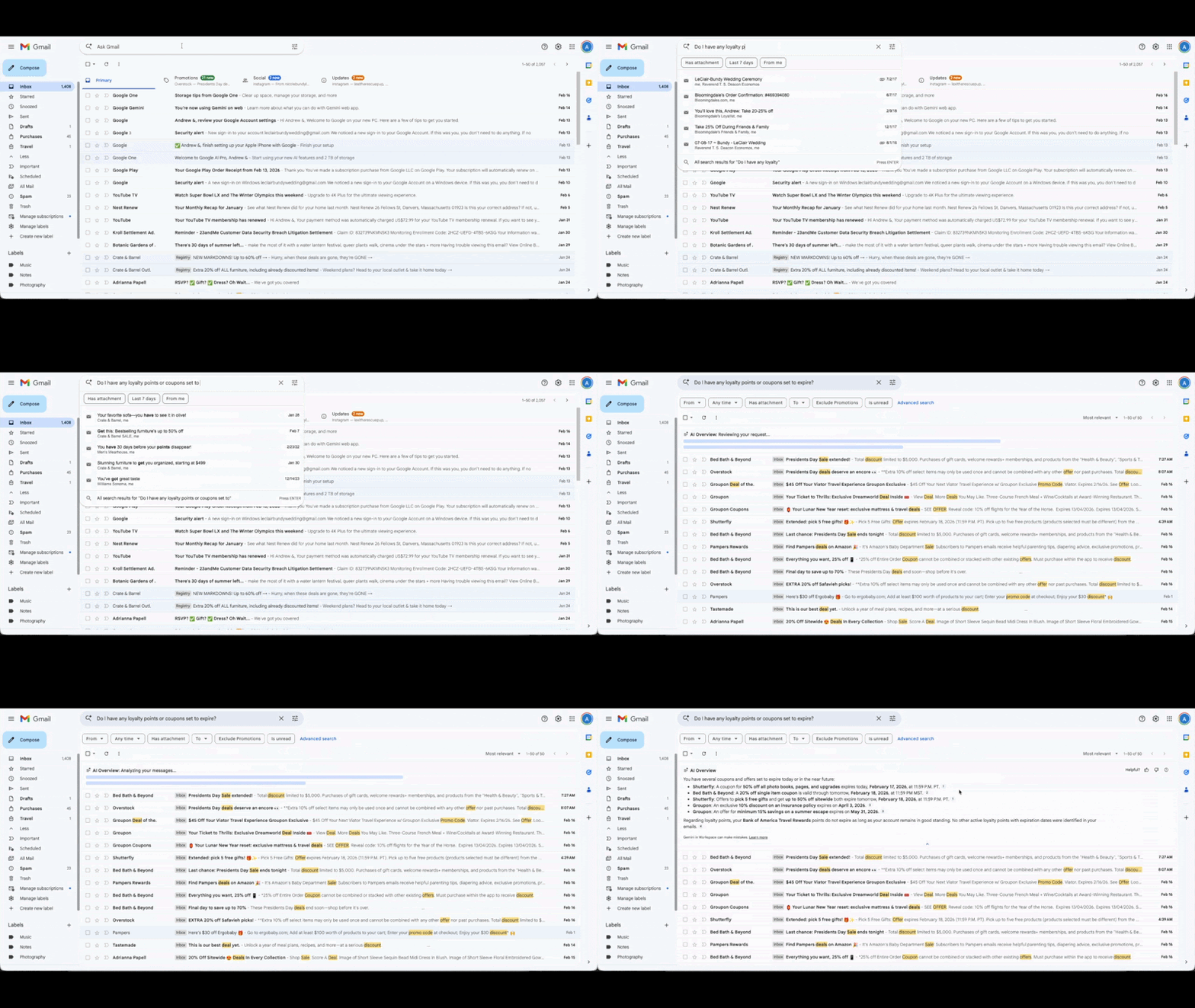
Think of it as having Gemini embedded directly into the Gmail search bar. Instead of typing in keywords and manually hunting through results, users can ask conversational questions like, “Where did I buy those blue shoes last month?” or “Do I have any coupons or loyalty points set to expire?”
Gmail then scans the inbox and generates an AI Overview—a summarized answer displayed prominently above traditional search results.
What are the Current Use Cases?
Today, there are two primary use cases supported:
Finding facts: Users can quickly retrieve specific information buried in transactional emails, such as purchase locations, bill due dates, and reservation details.
Synthesizing information across senders: Users can also ask questions that require combining information across multiple emails and brands such as “Do I have any discounts on clothing available right now?”
In both cases, the outcome is the same. AI now serves as the primary interface. Instead of manually scanning a list of emails, users receive AI-surfaced insights directly.
Have you checked out our AI in Retail Report yet?
See how 225 senior marketers are applying AI inside real programs and where it’s driving performance.
Under the hood, this experience is powered by Gemini’s semantic search capabilities. The model scans traditional elements such as subject lines, pre-headers and email body copy, along with additional sources including image alt text, text within images via Optical Character Recognition (OCR, or even attachments including PDFs and audio files.
Importantly, the model is not looking for exact keyword matches. It evaluates meaning and intent, which makes phrasing, clarity, and context significantly more important.
Gemini analyzes emails in this order:
Subject line
Pre-header
Email body, from header to footer
Attachments
Within that analysis, Gemini follows a path of least resistance. It first evaluates HTML and live text because this is the easiest format for the model to process. If sufficient information is found, the process stops there.
If more context is needed, the model moves to image alt text. Alt text has long been important for accessibility and deliverability, but it now also directly influences AI interpretability.
If necessary, Gemini then leverages OCR to extract written text from images. It does not currently interpret purely visual elements like lifestyle photography, only the text written within them.
What this Means for Email Marketers
AI-powered inbox search reinforces existing best practices while raising the stakes. To stay visible, marketers must prioritize:
Clear, descriptive subject lines: If a user asks about expiring loyalty points, is that language reflected in your subject or pre-header?
Meaningful live text: Critical promotional details should not live exclusively inside images.
Intent-aligned copy: Because Gemini evaluates semantic meaning, clarity beats cleverness.
Strategic alt text: Alt text is no longer just an accessibility requirement. It is an additional signal layer for AI interpretation.
The Bigger Shift
AI overviews in Gmail represent a fundamental shift. Inbox visibility is no longer just about earning opens and clicks. It’s now also about ensuring the AI has what it needs to answer a user’s question accurately.
As AI increasingly becomes the intermediary between brands and consumers, email content must be structured not only for humans, but also for models interpreting intent.
And while the feature is currently behind a paywall, history suggests that AI capabilities like this expand over time.
So the question isn’t whether conversational inbox search will scale. It’s whether your emails are ready for the AI when it does.
Related Resources
Is Your Personalization Strategy Actually Ready for AI? Four Questions to Find Out
Activate your data into personalized content in any customer engagement. Get a demo to see why the world’s most innovative brands rely on Movable Ink to drive customer engagement and accelerate their marketing performance.




%20copy.png)


.png)
.png)


