




Gmail is officially in its Gemini Era. And with that comes arguably the biggest change to the inbox experience we have seen in years (yes, iOS 18 included).
Gmail’s AI Inbox is currently in beta, available only to Google Trusted Testers, but expected to roll out more broadly in the U.S. in Q2 2026. It represents a meaningful shift in how email gets surfaced and prioritized.
What Is AI Inbox?
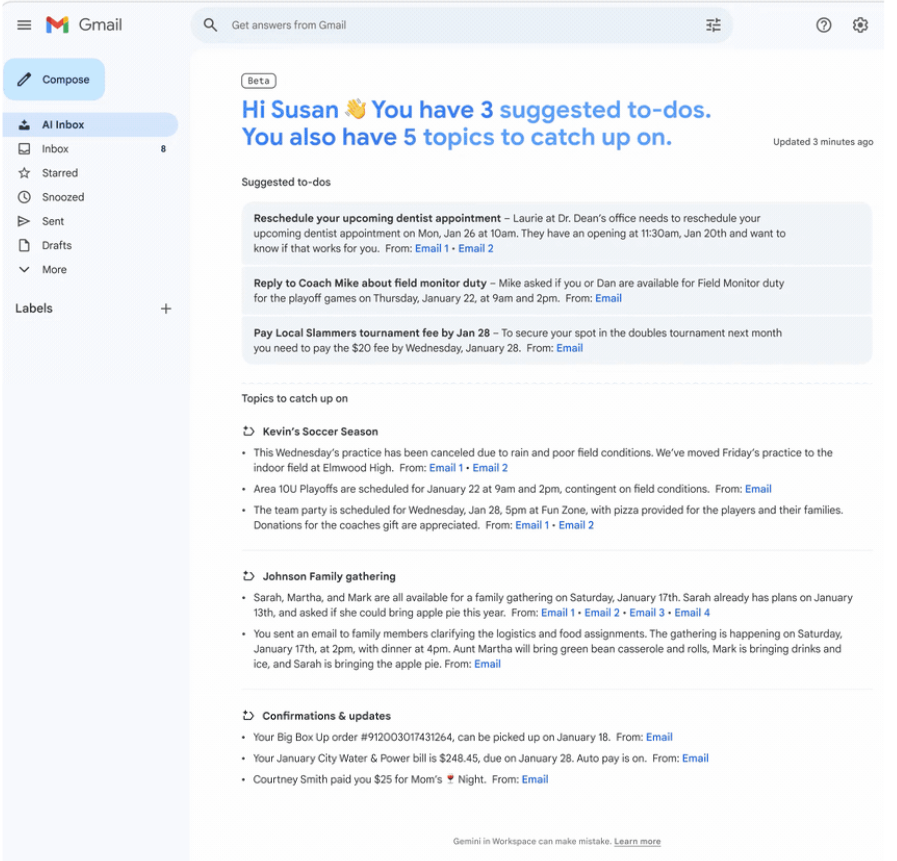
AI Inbox is a new view inside Gmail. It does not replace the traditional inbox or tabbed experience (Primary, Promotions, and other tabs still exist), but instead offers an additional page users can navigate to for a summarized, AI-curated view of their emails.
It organizes messages into two sections:
- Suggested To-Do’s: This section surfaces emails that require a user’s attention or immediate action like paying a bill, confirming an appointment, or enrolling in a service. The model identifies these high-priority items and highlights exactly what needs to be done in bold text.
- Topics to Catch Up On: This section summarizes important updates including upcoming reservations, recent purchases, travel confirmations, or even personal threads like messages from your kid’s soccer coach.
What’s the Impact on Marketing?
Let’s start with the hard truth. Marketing emails are likely excluded entirely from Suggested To-Do’s.
Based on what we know so far, if Google classifies a message as a “non-obligatory commercial offer” rather than a required task, it will not appear in this section.
But there may be an exception: user-specific, time-bound calls-to-action. Think, “Your $10 reward expires in 24 hours.” or “Your exclusive access to free shipping ends tonight.” These often represent value-loss prevention. If Google detects that a user could lose value by not taking action, it may include that message here.
However, it’s critical to note the content must be structured in a way the Gemini model can interpret and extract the task with high confidence to have any chance of being included.
That means:
- The user-specific, time-bound CTA must appear within the first 100–150 characters.
- The message must leverage structured data using JSON-LD, aligned with Schema.org standards, such as ServiceUpdate or DiscountOffer, along with properties like availabiltyStarts and availabilityEnds, and ViewAction or ConfirmAction.
On the other hand, marketing emails such as loyalty or progress updates, newsletters, or month/year in review can appear in the Topics to Catch Up On section, but only if Gmail considers you a VIP sender.
And becoming a VIP Sender isn’t a static badge. It’s dynamic. Continuously calculated by Gemini 3 based on the following criteria:
🔐 Authentication requirements
- 100% DMARC enforcement (p=reject) and BIMI authentication
👤 Local reputation (per user)
- Open rate within the last 30 days greater than 50%
- The user must have opened at least one of the previous five emails from your brand
- If there are zero opens for 30 days, local reputation resets
- Reply or click rate greater than 5%
- Delete-without-open rate less than 10%
🌍 Global reputation
- Spam rate below 0.1%
- At 0.3%, VIP status is lost immediately and is not restored until the rate remains low for seven consecutive days
%20copy.png)



.png)
.png)


