


.png)

Have you seen this lately?
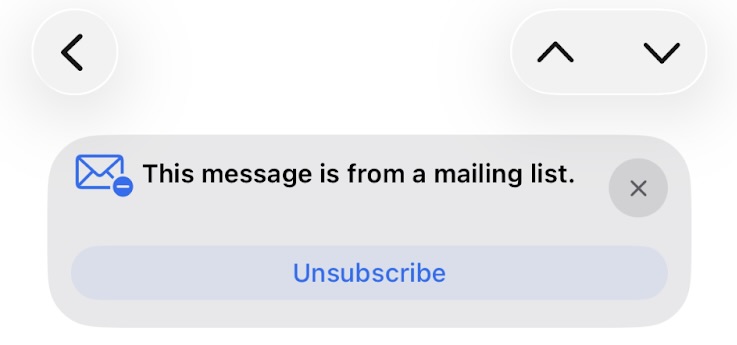
As marketers, we spend countless hours crafting the perfect email. We obsess over subject lines, copy, and designing beautiful visuals to capture attention. We debate send times, frequencies, you name it. The last thing we want is for someone to hit the “unsubscribe” button.
So when notifications like these land in your subscribers’ inboxes, it’s natural to think, “How do I prevent my customers from seeing them?”
But that’s actually the wrong question entirely.
What Exactly Is a List-Unsubscribe Header?
Technically speaking, these notifications are powered by the List-Unsubscribe header, a snippet of code included in your email header and separate from the body content. This allows email clients like Gmail, Apple Mail, and Yahoo to display a prominent “Unsubscribe” banner, often near the sender’s address, making it easy for recipients to opt out of future messages.
The Case for Including It
Implementing this header isn’t just a best practice. It’s a strategic business decision with direct impact on your bottom line.
- It reduces spam complaints.
This is the most critical benefit. When subscribers can unsubscribe easily, they are far less likely to hit “Mark as Spam.” Spam complaints are one of the fastest and most damaging ways to hurt your sender reputation, so giving email clients the signals they need to surface a prominent unsubscribe option helps protect against spam reports. - It boosts deliverability and improves list health.
A stronger sender reputation leads to better inbox placement. Your emails reach people who actually want to read them, while disengaged subscribers who are unlikely to convert naturally filter out. The result is higher open and click rates across your engaged audience. - It’s required.
As of February 2024, Gmail and Yahoo require bulk email senders, defined as sending more than 5,000 emails per day, to include a one-click list-unsubscribe header. Failure to comply does not just create a poor subscriber experience. It can cause your emails to be rejected or sent directly to spam.
But what about Apple Mail?
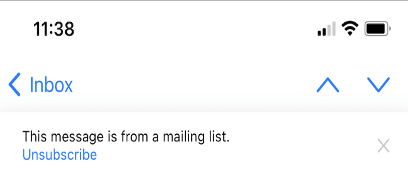
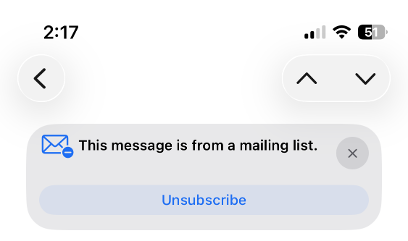
While this is not technically a requirement, Apple has long prioritized user experience and privacy, especially in recent releases like iOS 18 and iOS 26. When I asked an Apple employee for more context, they shared the following:
“There's no official documentation from Apple indicating that the "This message is from a mailing list" prompt is more prevalent after iOS 26. However, several users have reported seeing this message more frequently, especially after the update. This could be due to a few reasons, including changes in how Apple handles identifying mailing lists or changes to the Mail app itself.”
While this is not an official confirmation, it is reasonable to assume that Apple continues to evolve how it detects mailing lists, including signals like the List-Unsubscribe header. Apple is also clearly continuing to refine its Mail UI, making these notifications more visible and harder for subscribers to miss.
iOS 18:
iOS 26:
.png)
.png)
.png)
.png)
%20copy.png)
.png)


