
The challenge for brands today is not whether to personalize. It is having the workflow, content, and data activation capabilities to pull it off effectively.
That’s what this release is built around. Movable Ink’s Q1 2026 updates help remove the manual work that slows teams down, so marketers can spend less time fixing formatting, rebuilding creative, and chasing down details, and more time launching campaigns that feel relevant and meaningful.
Introducing Studio Designer Assistant
Transforming data for personalization often becomes a bottleneck before any real creative work can begin. Simple changes like tailoring data formats, cleaning up numbers, or adjusting how information displays can eat up time that should be spent building the campaign itself.
Designer Assistant helps remove that friction.
Now, marketers can describe what they want in plain language and Designer Assistant handles the formatting work, no coding or technical handoffs required. It’s a faster way to surface clean, accurate data in personalized, customer-facing content, so teams can move from idea to execution without getting stuck in configuration.
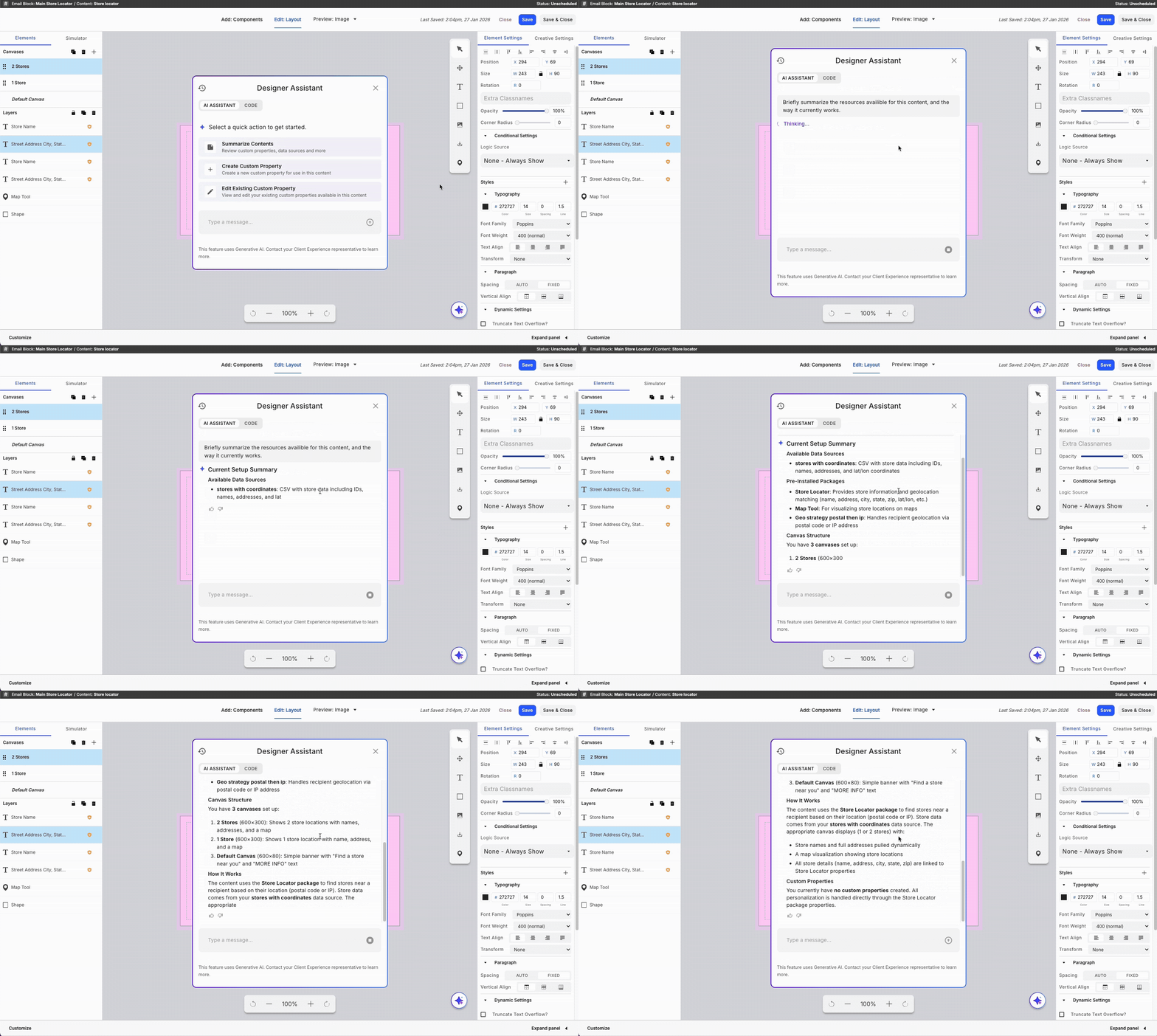
Here are a few examples of what that looks like in practice:
- Text formatting—Need product names capitalized or messaging standardized across an experience? Designer Assistant can reformat text instantly so everything looks consistent and on brand.
- Number formatting—Balances, prices, and counts often arrive in formats that don't work well in customer-facing content. Designer Assistant lets marketers quickly adjust how numbers appear, whether that’s adding commas or removing decimals, so figures are easier for customers to read.
- Date and time formatting—Dates from data feeds rarely match the format you want customers to see. Designer Assistant can convert them instantly so every campaign displays dates exactly as intended.
- Dynamic text and styling based on data—Marketers can also adjust messaging based on customer attributes, like changing text or styling for loyalty members, high-value customers, or other segments, without writing rules manually.
Enhancements to Da Vinci’s Creative Editor
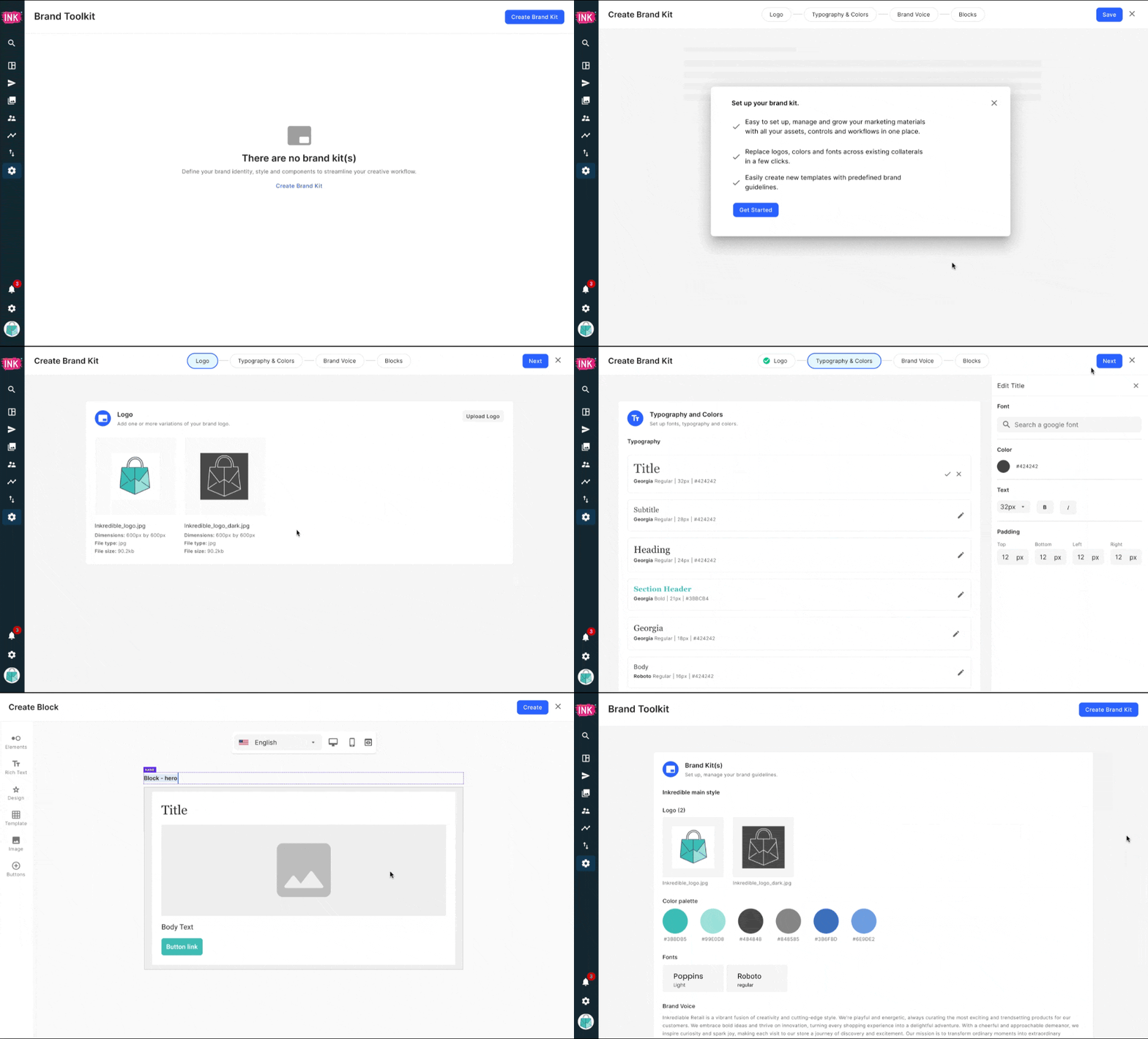
When brand assets are scattered across different systems, teams end up rebuilding the same elements repeatedly and struggling to track down key creatives.
Da Vinci’s latest updates make it easier to upload assets, reuse creative elements, and export metadata without bouncing between tools. Less manual work, more consistency.
Here’s what’s new:
- Brand Kit gives teams a centralized place to manage brand-approved logos, colors, and fonts directly in the UI. From there, assets can be applied to all content created in Da Vinci, making it easier to keep everything aligned with brand guidelines and styled consistently across creatives.
- Components (Early Access) let teams build, save, and reuse styled modules and layouts, like buttons, images, and text, across creatives. It helps reduce repetitive work and maintain consistency without starting from scratch each time.
- Export Creative Metadata directly from the Creative Index page, including creative name, start date, end date, status, and tags. This makes it easier to pull key details for reporting, monitor creative launches, and determine when creatives should be extended or retired.
See It In Action
We’re continuing to build new capabilities across Studio and Da Vinci. Stay tuned for more updates, or connect with our team to see what’s coming next.


.png)